 seolounge

Google Ads is not just another marketing platform it has quietly become one of the largest drivers of measurable business growth online. Today, it accounts for nearly 39% of global digital ad spend, making it the biggest advertising ecosystem in the world. More than 7 million advertisers actively run campaigns on Google, generating over 100 billion impressions every single day.
But the more important number for business owners is this: on average, businesses earn around $2 in revenue for every $1 spent on Google Ads. That’s roughly a 200% return on investment when campaigns are managed correctly.
Those results don’t happen by accident. They happen because Google Ads gives businesses access to people who are already searching not browsing, not scrolling, but actively looking for something specific.
The challenge, however, is not whether Google Ads works. The real question is which type of ad should you run. Search ads behave differently from Display ads. Shopping ads work differently from Video campaigns. Performance Max operates on a completely different logic compared to traditional campaigns.
If you don’t understand these differences, you’re not really running ads you’re guessing. In this guide, we’ll break down the main types of ads available inside Google Ads in a clear and practical way. No complicated terms. No theory overload. Just what each ad type is, where it appears, and when it actually makes sense to use it.
Search Ads
When someone types a query into Google, they usually want something specific. Not inspiration. Not entertainment. A solution.
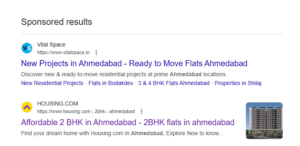
Search ads are the ads that appear directly inside the Google Search results when that happens. They are simple text ads, but they sit exactly where decisions are being made.
There’s no scrolling through feeds. No banner placements. Just a search bar, results, and your offer in front of someone actively looking.
That’s what makes this format different.
How Search Ads Actually Work
Search campaigns are built around keywords the words and phrases people type into Google.
You choose the search terms relevant to your business. If someone searches using those terms, your ad becomes eligible to appear. Google then decides which ads show based on relevance and other factors, and if the person clicks, you pay. That’s the pay-per-click model.
Today, most campaigns use responsive search ads, where you write multiple headlines and descriptions. Google rotates combinations and learns which ones perform better. You still control the message, but the system tests variations automatically.
Simple structure. Clear logic.
Where Search Ads Appear
Search ads appear:
- At the top of Google Search results
- At the bottom of the results page
- Occasionally on search partner sites
They do not appear randomly across websites. They stay within the search environment, where intent is strongest.
Why Businesses Use Search Ads
Search campaigns are commonly used for:
- Lead generation
- Appointment bookings
- Service inquiries
- High-value purchases
- Local service calls
Search Ad works especially well when:
- People know what they need
- The problem is urgent
- The search terms are specific
If someone searches “commercial roofing contractor Dallas,” that’s not curiosity. That’s buying behavior.
When Search Ads Make Financial Sense
Search campaigns are profitable when real demand already exists. If your industry has steady search volume and clear buying intent, Search ads can convert efficiently.
Search ad less effective when:
- The product is completely new
- No one searches for the category yet
- The purchase decision is purely visual or impulse-driven
This is why an experienced ppc comapny doesn’t recommend Search ads blindly. An experienced ppc expert looks at search data first before suggesting anything. Demand determines whether this format will work.
When Search Ads Are Usually Profitable and When They’re Not
|
Business Type |
Are Search Ads Profitable? |
Why |
| Local service providers (plumbers, lawyers, dentists, contractors) |
✅ Yes |
People search when they need help immediately. Clear buying intent exists. |
| B2B service businesses (consultants, accountants, agencies) |
✅ Yes |
Decision-makers search specific services before contacting providers. |
| Ecommerce stores selling known products |
✅ Yes |
Users search product names or categories with purchase intent. |
| Emergency services (locksmith, towing, repair) |
✅ Yes |
Urgent searches often convert quickly. |
| Brand-new product categories |
❌ Usually No |
If no one searches for it yet, Search ads cannot create demand. |
| Visual or impulse-based products (fashion startups, lifestyle brands) |
❌ Not ideal initially |
Discovery-based formats often perform better at the beginning. |
| App-only businesses without search demand |
❌ Limited |
App or video campaigns may be more effective than Search. |
Display Ads
Search campaigns show up when someone asks Google a question.
Display works differently. It shows up when someone isn’t asking anything at all.
You’ve seen these ads without thinking about them a product banner on a news site, a visual ad inside a mobile app, a brand message while reading an article. Those are Display ads, and they run across what’s called the Google Display Network a large collection of websites and apps where Google can place ads.
Unlike Search ads, which are built around keywords, Display campaigns focus more on people than on queries.
How Display Ads Actually Work
With Display, you’re not targeting what someone types. You’re targeting who they are or what they’ve been doing online.
You can show ads to:
- People who visited your website before
- People browsing certain types of content
- Users interested in specific topics
- Audiences that resemble your existing customers
The most practical use of Display is remarketing.
Let’s say someone visits your service page, checks your pricing, and leaves. They didn’t convert but they showed interest. Display lets you stay visible to that person while they move across other sites. It’s not chasing them. It reminds them you exist.
Because Display relies on image ads and banner ads, the creative matters. A weak design gets ignored instantly. A clear, strong visual can bring someone back who was already considering you.
It’s less about urgency and more about visibility.
When Display Makes Sense and When It Doesn’t
Display isn’t a “run it for everything” channel. It works well in certain business models and wastes money in others.
Here’s a realistic breakdown:
|
Business Type |
Is Display Usually Worth It? |
Why |
| Ecommerce stores with abandoned carts |
✅ Yes |
Remarketing can recover lost sales. |
| B2B companies with long decision cycles |
✅ Yes |
Keeps brand visible while prospects compare options. |
| Real estate, education, high-ticket services |
✅ Yes |
Buyers take time — repeated exposure helps. |
| Small local emergency services |
❌ Usually No |
People search when they need help immediately. |
| New businesses with zero website traffic |
❌ Not yet |
Remarketing requires existing visitors. |
| Very small budgets with no testing room |
⚠️ Risky |
Display can burn spend quickly if targeting is broad. |
Display campaigns require patience and clean targeting. If you run them broadly with no audience control, you’ll get impressions but not results.
That’s where many businesses go wrong.
Display isn’t designed to replace Search. It plays a different role. It supports awareness, reinforces credibility, and brings back visitors who almost converted.
Used with intention, it strengthens the overall strategy. Used blindly, it drains budget.
Shopping Ads
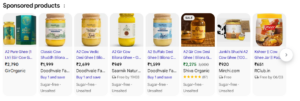
If you’ve ever searched for a product on Google and immediately seen images with prices at the top of the page, those are Shopping ads also known as Product Listing Ads (PLA).
They don’t look like regular text ads. There’s no long description. No persuasive copy. Just a product image, the price, the store name, and sometimes reviews. That simplicity is exactly why they work.
Shopping campaigns are built specifically for ecommerce advertising. They’re designed for businesses that sell physical products and want to drive online purchases, not just website visits.
Where Shopping Ads Appear
Shopping ads typically show:
- At the top of Google search results
- Inside the Google Shopping tab
- Across product comparison sections
- On mobile and desktop search experiences
Unlike Search campaigns, Shopping ads don’t rely on manual keywords in the traditional sense. Instead, they pull information directly from your product data.
That’s where many businesses misunderstand how they work.
How Shopping Ads Actually Work
Shopping campaigns are powered by your product feed.
You upload your product information titles, descriptions, prices, availability, and images — into Google Merchant Center. Google then uses that data to decide when your products are relevant to a search query.
So instead of choosing keywords manually, Google matches search terms to the information inside your product feed.
If someone searches for “black leather office chair,” Google scans product feeds from different stores and shows items that match those words.
That means your feed isn’t just a technical requirement. It’s the foundation of your campaign.
If your product titles are vague, your images are poor, or your pricing isn’t competitive, your Shopping ads won’t perform well no matter how much budget you allocate.
Why Product Feed Quality Matters More Than Budget
With Shopping ads, data quality often matters more than ad copy.
Google uses:
- Product titles
- Descriptions
- Categories
- Pricing
- Stock status
to determine when and how often your ads show.
Two stores can sell the same product. The one with clearer product data and sharper images usually wins more impressions.
Pricing competitiveness also plays a major role. Because Shopping ads are shown side by side, customers can compare prices instantly. If your product is significantly higher without added value, clicks may drop.
This is where many ecommerce brands struggle. They focus on ad spend but ignore product feed optimization.
When Shopping Ads Make Sense and When They Don’t
Shopping campaigns are highly effective for:
|
Business Type |
Are Shopping Ads a Good Fit? |
Why |
| Ecommerce stores selling physical products |
✅ Yes |
Designed specifically for product-based businesses. |
| Retail brands with competitive pricing |
✅ Yes |
Price comparison works in their favor. |
| Stores with strong product images |
✅ Yes |
Visual clarity increases clicks. |
| Service-based businesses |
❌ No |
Shopping ads are for products, not services. |
| Custom or quote-based businesses |
❌ Usually No |
Works best when fixed pricing exists. |
| Businesses without structured product data |
❌ Not ideal |
Feed quality directly impacts performance. |
Shopping ads are not built for everyone. They are built for structured, product-driven businesses that can compete on data and price.
When managed correctly, they shorten the buying journey. Customers see the product, the price, and the store before they even click. That filters out low-intent traffic and often improves conversion quality.
Shopping campaigns don’t rely on clever copy. They rely on clean data, accurate pricing, and strong visuals.
For ecommerce brands that get those basics right, they can become one of the most consistent revenue drivers inside Google Ads.
Video Ads

Not every customer is ready to search.
Sometimes they need to see you first.
That’s where Video ads come in. Instead of appearing inside search results or across websites as banners, these ads show up inside video content most commonly on YouTube. In fact, when people refer to YouTube ads, they’re usually talking about Google’s video campaigns.
Video advertising works differently from text or product ads. It’s not about answering a question. It’s about introducing a brand, explaining a service, or creating familiarity before someone starts comparing options.
Where Video Ads Appear
Most video campaigns run on YouTube, but they can also appear across Google’s video partner network.
You’ll typically see them as:
- In-stream ads that play before or during a YouTube video
- Skippable ads that viewers can skip after a few seconds
- Non-skippable ads that must be watched before the content continues
- Short bumper ads that run for a few seconds
The placement feels natural because it blends into content people are already watching.
How Video Ads Actually Work
Unlike Search campaigns that rely heavily on keywords, video campaigns focus more on audience targeting.
You can show ads to:
- People interested in certain topics
- Viewers of related YouTube channels
- Users who previously visited your website
- Custom audiences based on search behavior
Because the format is visual and often longer than a banner or text ad, the message has more room to breathe. You can demonstrate a product, explain a service, or tell a short story.
But here’s the part most blogs don’t say clearly:
Video ads rarely convert directly.
Most people don’t watch a video and immediately fill out a form. They watch, absorb, and move on. That doesn’t mean the campaign failed. It means the role of video is different.
What Video Ads Are Actually Good For
Video campaigns are strong for:
- Brand awareness
- Product education
- Introducing new services
- Building credibility
- Warming up cold audiences
If someone sees your brand multiple times while watching relevant content, recognition builds. And recognition lowers resistance later.
This is where strategy matters.
Video often works best when paired with Search campaigns. Someone sees your brand in a video today. A week later, they search for the service you provide. When your Search ad appears, it feels familiar. That familiarity increases the chance they click.
When Video Campaigns Make Sense
Video ads tend to work well for:
|
Business Type |
Are Video Ads Useful? |
Why |
| New brands entering competitive markets |
✅ Yes |
Helps build recognition early. |
| Businesses with complex services |
✅ Yes |
Video explains better than text. |
| Ecommerce brands launching new products |
✅ Yes |
Visual storytelling increases interest. |
| Local emergency services |
❌ Not ideal |
Urgent searches convert better through Search. |
| Very small budgets focused only on immediate leads |
⚠️ Limited |
Video may not produce instant ROI. |
Video advertising is not a quick win channel. It’s a positioning channel.
If your goal is immediate form submissions tomorrow, Search is usually stronger. If your goal is to build presence so that future searches convert more easily, video plays an important role.
Used properly, video builds familiarity. And familiarity reduces friction when the buying decision finally happens.
Performance Max Ads
Performance Max is Google’s all-in-one campaign type.
Instead of running separate campaigns for Search, Shopping, Display, and YouTube, you give Google your creative assets, your budget, and your goal. The system then decides where to show your ads across:
- Search
- Display
- YouTube
- Gmail
- Maps
- Shopping
It’s Google’s version of multi-channel advertising under one roof.
That sounds efficient. And sometimes it is.
But here’s what most explanations skip:
You’re giving up control in exchange for automation.
How Performance Max Really Operates
You don’t manage traditional keywords the way you do in Search campaigns. You provide:
- Headlines
- Descriptions
- Images and videos
- A product feed (for ecommerce)
- Clear conversion goals
- Optional audience signals
From there, Google’s smart bidding system takes over. It decides where your ads show and how much to bid, based on where it predicts conversions will happen.
That prediction depends entirely on your past data.
If your tracking is clean and you already generate consistent conversions, PMax has something to learn from.
If your data is thin or inaccurate, it’s guessing.
Automation is powerful but it only works with strong inputs.
When Performance Max Makes Sense
Performance Max tends to work well for businesses that already have:
|
Business Situation |
Is PMax a Good Fit? |
Why |
| Ecommerce brands with steady sales volume |
✅ Yes |
Product data + conversion history help automation scale. |
| Accounts with accurate tracking and 50+ conversions per month |
✅ Yes |
Smart bidding needs data to optimize effectively. |
| Businesses already running multiple campaign types |
✅ Yes |
Can capture incremental conversions across channels. |
| Brands with strong creative assets (images & video) |
✅ Yes |
PMax relies heavily on asset quality. |
In these cases, automation can uncover additional volume without constant manual adjustments.
When Performance Max Becomes Risky
Now the part that rarely gets discussed clearly:
|
Business Situation |
Is PMax Risky? |
Why |
| New accounts with little to no conversion data |
❌ Yes |
The system doesn’t have enough learning history. |
| Poor or inaccurate conversion tracking |
❌ Yes |
It optimizes toward the wrong signals. |
| Businesses needing strict keyword control |
❌ Yes |
You lose visibility into detailed search terms. |
| Very small monthly budgets |
⚠️ Often |
Automation needs room to test and learn. |
If you don’t know exactly what counts as a conversion in your account, Performance Max will amplify that confusion.
It doesn’t fix structural problems. It magnifies them.
The Most Important Rule: Fix Tracking First
Before launching PMax, you should ask:
- Are all conversions tracked correctly?
- Are duplicate conversions removed?
- Are primary goals clearly defined?
- Is there enough historical data?
If the answer is unclear, Performance Max is premature.
Because once automation takes over, your results depend almost entirely on what you feed it.
The Real Trade-Off
Performance Max offers scale and simplicity.
Manual campaigns offer control and transparency.
Neither is universally better.
For mature accounts with reliable data, PMax can unlock additional performance across channels. For newer or unstable accounts, traditional Search and Shopping campaigns often produce cleaner, more predictable results.
Automation is not magic.
It’s math.
And math only works when the numbers are correct.
App Campaigns

What Is an App Campaign?
An App Campaign is a campaign type inside Google Ads designed specifically to promote a mobile application. Its purpose isn’t to drive traffic to a website. It’s to get people to download and use your app.
If you don’t have a mobile app listed on the Google Play Store (or App Store), this campaign type doesn’t apply to you. It’s that simple.
App Campaigns are built for businesses whose revenue depends on mobile users — delivery apps, fintech apps, ecommerce apps, SaaS tools, marketplaces, subscription apps, and similar models.
What App Campaigns Actually Do
App Campaigns focus on two main outcomes:
- Driving app installs
- Driving specific in-app actions (like purchases, sign-ups, subscriptions)
The first goal is easy to measure — installs.
The second goal is what actually matters — usage and revenue.
Many businesses celebrate install numbers. But installs without engagement are just downloads that disappear.
App Campaigns are meant to bring in users who don’t just install, but open the app, use it, and ideally spend money inside it.
How App Campaigns Work
App Campaigns fall under automated mobile advertising.
You don’t select traditional keywords like in Search campaigns. Instead, you provide:
- Your app listing
- A few short text variations
- Images or videos
- A defined goal (installs or in-app conversions)
Google then shows your ads across:
- Google Search
- YouTube
- The Google Play Store
- Display placements inside apps and websites
The system uses behavior patterns and user signals to find people who are more likely to install.
But here’s what really determines success:
Your data.
If your conversion tracking inside the app is clean — meaning installs and in-app events are measured correctly Google can optimize toward users who are more likely to take meaningful action.
If tracking is unclear or incomplete, the system optimizes toward cheap installs, not valuable users.
That’s where many businesses lose money.
When App Campaigns Make Sense
App Campaigns work when the business model supports paid acquisition.
Here’s a practical breakdown:
|
Business Type |
Do App Campaigns Make Sense? |
Why |
| Food delivery, ride-share, marketplace apps |
✅ Yes |
Revenue depends directly on active mobile users. |
| Ecommerce brands with strong repeat app purchases |
✅ Yes |
Higher lifetime value can justify acquisition cost. |
| Subscription-based mobile apps |
✅ Yes |
Recurring revenue supports scaling installs. |
| Businesses without an app |
❌ No |
There’s nothing to promote. |
| Apps with poor retention or low ratings |
❌ Not yet |
Paid installs won’t fix product issues. |
| Companies that don’t know their cost per install or user value |
⚠️ Risky |
Without numbers, scaling becomes guesswork. |
Before running App Campaigns, a business should know:
- Average cost per install (CPI)
- User retention rate
- Lifetime value (LTV)
- Break-even acquisition cost
If those numbers are unclear, paid app growth is premature. Because installs alone don’t build a business. Active users do.
App Campaigns
What Is an App Campaign?
An App Campaign is a campaign type inside Google Ads designed specifically to promote a mobile application. Its purpose isn’t to drive traffic to a website. It’s to get people to download and use your app.
If you don’t have a mobile app listed on the Google Play Store (or App Store), this campaign type doesn’t apply to you. It’s that simple.
App Campaigns are built for businesses whose revenue depends on mobile users — delivery apps, fintech apps, ecommerce apps, SaaS tools, marketplaces, subscription apps, and similar models.
What App Campaigns Actually Do
App Campaigns focus on two main outcomes:
- Driving app installs
- Driving specific in-app actions (like purchases, sign-ups, subscriptions)
The first goal is easy to measure — installs.
The second goal is what actually matters — usage and revenue.
Many businesses celebrate install numbers. But installs without engagement are just downloads that disappear.
App Campaigns are meant to bring in users who don’t just install, but open the app, use it, and ideally spend money inside it.
How App Campaigns Work
App Campaigns fall under automated mobile advertising.
You don’t select traditional keywords like in Search campaigns. Instead, you provide:
- Your app listing
- A few short text variations
- Images or videos
- A defined goal (installs or in-app conversions)
Google then shows your ads across:
- Google Search
- YouTube
- The Google Play Store
- Display placements inside apps and websites
The system uses behavior patterns and user signals to find people who are more likely to install.
But here’s what really determines success:
Your data.
If your conversion tracking inside the app is clean — meaning installs and in-app events are measured correctly Google can optimize toward users who are more likely to take meaningful action.
If tracking is unclear or incomplete, the system optimizes toward cheap installs, not valuable users.
That’s where many businesses lose money.
When App Campaigns Make Sense
App Campaigns work when the business model supports paid acquisition.
Here’s a practical breakdown:
| Business Type | Do App Campaigns Make Sense? | Why |
| Food delivery, ride-share, marketplace apps | ✅ Yes | Revenue depends directly on active mobile users. |
| Ecommerce brands with strong repeat app purchases | ✅ Yes | Higher lifetime value can justify acquisition cost. |
| Subscription-based mobile apps | ✅ Yes | Recurring revenue supports scaling installs. |
| Businesses without an app | ❌ No | There’s nothing to promote. |
| Apps with poor retention or low ratings | ❌ Not yet | Paid installs won’t fix product issues. |
| Companies that don’t know their cost per install or user value | ⚠️ Risky | Without numbers, scaling becomes guesswork. |
Before running App Campaigns, a business should know:
- Average cost per install (CPI)
- User retention rate
- Lifetime value (LTV)
- Break-even acquisition cost
If those numbers are unclear, paid app growth is premature. Because installs alone don’t build a business. Active users do.
Local Ads & Local Services Ads
If your business serves a specific city or region, broad advertising rarely makes sense.
When someone searches “plumber near me” or “divorce lawyer in Austin,” they don’t want options across the country. They want someone local. That’s where Local ads and Local Services Ads come into play.
These formats are built specifically for service providers who operate in defined areas — plumbers, electricians, lawyers, contractors, HVAC companies, cleaning services, and other home service businesses.
But here’s where most articles stop. They treat Local Ads and Local Services Ads as the same thing.
They’re not.
What Are Local Ads?
Local ads are standard Google Ads campaigns designed to increase visibility within a specific geographic area. They can appear in:
- Google Maps ads
- Local search results
- The local 3-pack area
- Nearby business listings
These ads usually drive users to:
- Your website
- Your Google Business Profile
- Directions to your location
- Phone calls
You still operate on a traditional pay-per-click model. Someone clicks, you pay.
Local ads work well for businesses that want more store visits, map visibility, or phone inquiries within a defined radius.
What Are Local Services Ads (LSA)?
Local Services Ads are different.
They appear at the very top of local search results, often above regular Search ads. You’ve probably seen them they show business names, ratings, and a “Google Guaranteed” badge.
Unlike traditional campaigns, LSAs operate on a pay per lead model. You don’t pay for clicks. You pay when someone contacts you directly through the ad.
That’s a major difference.
You also go through a verification process. Only verified businesses are allowed to run Local Services Ads. Background checks and license verification are often required, depending on the industry.
This format was built for high-intent service categories like:
- Plumbers
- Electricians
- Roofers
- Lawyers
- HVAC contractors
- Pest control companies
It’s designed for people who need immediate help.
How Local Ads and Local Services Ads Work
Local Ads work like standard Google Ads — just focused on a specific location. You choose your service area, set keywords, and pay when someone clicks. Your visibility depends on relevance, proximity, reviews, and landing page alignment.
Local Services Ads work differently.
You don’t manage keywords the same way. Instead, Google ranks verified businesses based on:
- Location
- Reviews
- Responsiveness
- Budget
- Service category
You pay per lead not per click.
Here’s what most businesses don’t realize:
If you miss calls or respond slowly, your Local Services Ads visibility can drop. Google tracks responsiveness. Operational discipline matters as much as budget.
Local Ads reward targeting and landing page quality.
Local Services Ads reward reputation and response speed.
Both can work but only if the business behind the ad is ready to handle the demand.
The Key Difference: Local Ads vs Local Services Ads
Here’s the practical breakdown:
|
Feature |
Local Ads |
Local Services Ads |
|
Payment Model |
Pay per click | Pay per lead |
|
Placement |
Maps & local search |
Top of local search results |
| Verification Required |
No |
Yes |
|
Best For |
Businesses with websites and location pages |
Licensed service providers |
| Control | Full keyword control |
Less keyword control |
Local Ads behave like standard PPC campaigns, just geographically focused.
Local Services Ads operate more like a marketplace model. Google matches leads directly to providers.
Because of the pay per lead structure, LSAs often feel more predictable for service businesses. You’re paying for actual inquiries, not just website visits.
When Local Formats Make Sense
|
Business Type |
Are Local Ads Useful? |
Are Local Services Ads Useful? |
Why |
| Plumbers & HVAC companies |
✅ Yes |
✅ Yes |
High-intent, emergency-driven searches. |
| Law firms (family, personal injury) |
✅ Yes |
✅ Yes |
Strong local demand and urgency. |
| Contractors & home improvement |
✅ Yes |
✅ Yes |
Location-based decision making. |
| Retail stores |
✅ Yes |
❌ No |
Store visits matter more than service leads. |
| Online-only businesses |
❌ No |
❌ No |
No physical service area. |
For local service businesses, this is often the highest commercial-intent traffic available.
When someone searches “roof repair near me,” they’re not browsing. They’re hiring.
How Digi Growth Lab Helps You Grow with Google Ads
At Digi Growth Lab, we don’t just run ads we look at how your business actually makes money.
Before touching campaigns, we check demand, competition, tracking setup, and how your leads are handled. If the foundation isn’t right, scaling ad spend doesn’t help. Many businesses lose money because no one fixes the basics first.
We’ve worked with service companies and ecommerce brands that needed predictable growth, not just more clicks. That’s why our approach stays simple: clear goals, controlled budgets, constant testing, and honest reporting.
If you’re searching for a ppc agency that focuses on profitability over impressions, our ppc management services are built around measurable growth not marketing noise.
Struggling to Choose the Right Google Ads Strategy?
DGL helps businesses run high-performing Google Ads campaigns that drive quality traffic and maximize ROI.
FAQs
Which type of Google Ads campaign should I choose for my business?
The right Google Ads campaign depends on your business goals. Search Ads work best for capturing high-intent leads, Display Ads help build brand awareness, Shopping Ads are ideal for eCommerce products, Video Ads are effective for engagement on YouTube, and Performance Max campaigns help maximize conversions across multiple Google platforms using automation.
How do Google Ads help businesses get more customers?
Google Ads helps businesses reach potential customers when they are actively searching for products or services online. By targeting relevant keywords, locations, and audiences, businesses can show ads to users who are most likely to convert, driving qualified traffic, leads, and sales.
Are Google Ads suitable for small businesses?
Yes, Google Ads is highly effective for small businesses because it allows advertisers to set their own budget and control spending. Even with a small budget, businesses can run targeted campaigns, track performance, and optimize ads to generate leads and sales.
What factors determine the success of a Google Ads campaign?
Several factors influence the performance of a Google Ads campaign, including keyword targeting, ad relevance, landing page experience, bidding strategy, and audience targeting. Proper campaign optimization and continuous testing are essential for improving conversions and maximizing ROI.
How much does it cost to run Google Ads campaigns?
The cost of Google Ads varies depending on factors such as industry competition, keywords, location, and bidding strategy. Businesses can control their daily budget and only pay when someone clicks on their ad, making it a flexible advertising solution for companies of all sizes.