 seolounge

Technical SEO is a pillar of winning in organic search. Without it, even great content wont make the SERPs if bots can’t properly crawl, index, and comprehend your site.
By 2026, using SEO just for keywords will be a thing of the past its now all about crawl efficiency, how AI indexes, Core Web Vitals, structured data, and the perfection of the technical side of things.
It is reported from research that if a website upgrades its technical health, it can expect a 30-40% increase in organic visibility in 36 months.
This technical SEO checklist from start to finish is designed to help you keep your site safe in the ever, changing digital landscape of 2026 and later.
What Is Technical SEO?
Technical SEO is all about fine, tuning the technical aspects of a website to make it easier for search engines to crawl, index, and comprehend the content. So, it mainly deals with aspects like loading speed, how well the site works on mobile devices, structured data, security (HTTPS), XML sitemaps, and the general website architecture.
While content optimization is more visible, technical SEO is the unseen layer. It is the main factor that search engine bots get to your pages without any errors, they can correctly understand your pages, and then, based on relevance and quality, rank your pages.
Why Technical SEO Matters in 2026 (AI Search + Crawl Efficiency)
The importance of technical SEO in 2026 is higher than ever before.
Search engines now use AI-driven systems to evaluate websites. These systems prioritize:
- Fast-loading pages
- Mobile-first experiences
- Clean site architecture
- Structured data for better understanding
- Efficient crawl paths
If a website has issues such as crawl errors, slow loading speed, or unorganized structure, AI platforms might find it difficult to understand the content even if the content is of good quality.
Moreover, crawl budget optimization is turning out to be a necessity, particularly for expanding or big websites. Search engines decide on the number of resources that they can dedicate to crawling each site. If your technical setup squanders that budget on things like broken links, duplicate pages, or redirect chains, then the important pages might not be indexed.
In 2026, technical SEO won’t be an option anymore, it will be the base that enables content, backlinks, and brand authority to work effectively in AI, driven search environments.
Complete Technical SEO Checklist for 2026
Crawlability & Indexing
Before search engines rank your website, they must first discover, crawl, and store your pages.
If any of these steps fail, your content won’t appear in search — no matter how good it is.
Crawlability ensures bots can access your website.
Indexing ensures the right pages are saved and eligible to rank.
Here’s how to make sure your site is fully accessible and technically clean.
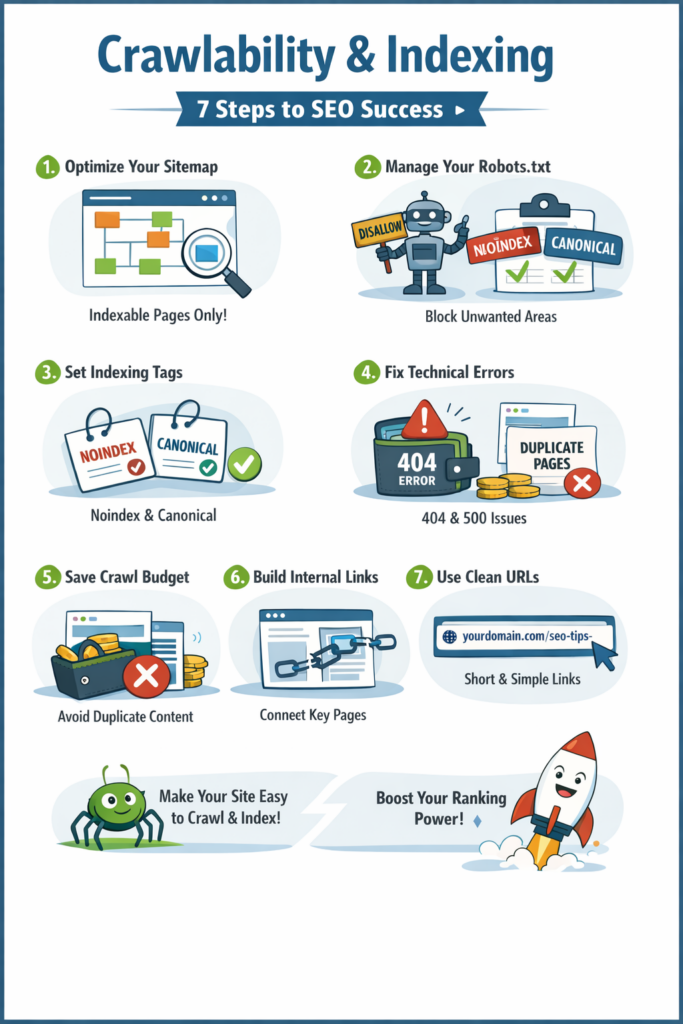
Step 1: Make Your Important Pages Discoverable
Search engines require a well, defined roadmap to your content. Your XML Sitemap is the key to that.
A properly optimized sitemap should:
- Contain only indexable, valuable pages
- Exclude redirects, errors, and duplicate URLs
- Update automatically when new pages are added
- Be submitted through Google Search Console
When structured correctly, your sitemap helps search engines prioritize what matters most.
Step 2: Control What Search Engines Can Access
Your robots.txt file acts as a traffic controller.
It should:
- Block admin, login, and staging pages
- Prevent crawling of low-value areas
- Allow access to all important content
- Include your sitemap URL
A small configuration mistake here can accidentally block important pages — so careful management is essential.
Step 3: Send Clear Indexing Signals
Search engines use technical signals to decide which web pages they should rank higher.
Two critical tools:
No index Tag: Put a No index tag on the pages that you wouldn’t want to be found in the search results (thank, you pages, internal search results, thin content).
Canonical Tag : Put a Canonical tag on the pages that are very similar to each other. It is a signal to search engines which one is really the original one.
These signals help to avoid duplicate content problems and to safeguard your ranking authority.
Step 4: Remove Technical Barriers
Errors disrupt crawling and reduce trust.
Common issues include:
- 404 errors (page not found)
- 500 errors (server problems)
- Soft 404 pages (low-value content returning success status)
To maintain site health:
- Redirect deleted pages properly
- Fix broken internal links
- Regularly monitor Search Console
A technically clean website gets crawled more consistently.
Step 5: Protect Your Crawl Budget
Search engines allocate limited crawl resources to each website.
If those resources are wasted on:
- Duplicate pages
- URL parameters
- Redirect chains
- Thin content
Important pages may not get crawled frequently.
Keep your website focused, streamlined, and free from unnecessary URLs.
Step 6: Strengthen Your Internal Structure
If a page has no internal links, it becomes difficult for search engines to find.
Every key page should:
- Be reachable within a few clicks
- Have contextual internal links
- Fit logically within your site hierarchy
Strong internal linking improves discoverability and distributes authority effectively.
Step 7: Keep URLs Clean and Logical
URL structure impacts both crawl efficiency and user trust.
Best practice:
- Use short, readable URLs
- Include keywords naturally
- Avoid unnecessary parameters
- Maintain consistent folder structure
Example of a clean URL:
yourdomain.com/technical-seo-checklist
Clear URLs make indexing easier and improve click-through rates.
Website Speed & Performance Optimization
Speed directly impacts rankings, user experience, and conversions.
If your website loads slowly, users leave.
If users leave, rankings drop.
In 2026, performance is not optional. Search engines evaluate real user experience using measurable speed metrics.
Here’s how to optimize your website for maximum performance.

Step 1: Optimize Core Web Vitals
Core Web Vitals measure how users actually experience your website.
The three key metrics in 2026:
LCP (Largest Contentful Paint)
How fast the main content loads.
Target: Under 2.5 seconds.
CLS (Cumulative Layout Shift)
How stable the layout is while loading.
Target: Close to 0.
INP (Interaction to Next Paint)
How quickly your website responds to user interactions.
Target: Under 200ms.
To improve these:
- Optimize hero images
- Reduce heavy JavaScript
- Reserve space for images and ads
- Improve server response time
Passing Core Web Vitals builds algorithmic trust.
Step 2: Optimize Images Properly
Images are often the biggest performance issue.
To fix this:
- Use next-gen formats like WebP or AVIF
- Compress images before uploading
- Resize images to correct dimensions
- Avoid uploading large original files
Optimized images reduce page weight significantly.
Step 3: Implement Lazy Loading
Lazy loading ensures images and videos load only when users scroll to them.
This improves:
- Initial page speed
- Core Web Vitals scores
- Server performance
Load what users see first — delay the rest.
Step 4: Use a CDN (Content Delivery Network)
A CDN distributes your website content across multiple global servers.
This results in:
- Faster load times worldwide
- Reduced server stress
- Improved reliability
If your audience is spread across regions, CDN becomes essential.
Step 5: Minify CSS & JavaScript
Large CSS and JS files slow down page rendering.
Optimization includes:
- Removing unused code
- Minifying files
- Deferring non-critical scripts
- Eliminating unnecessary plugins
Cleaner code improves load and interaction speed.
Step 6: Improve Server Response Time
Even a well-optimized website will struggle with a slow server.
To improve performance:
- Choose reliable hosting
- Enable caching
- Optimize databases
- Upgrade outdated configurations
A fast server supports everything else.
Step 7: Reduce Render-Blocking Resources
Render-blocking resources delay visible content from appearing.
To reduce this:
- Defer non-critical JavaScript
- Inline critical CSS
- Remove unnecessary third-party scripts
The faster your content appears, the better user engagement and rankings.
Step 8: Test Mobile Performance
Google uses mobile-first indexing.
Your website must:
- Load quickly on mobile networks
- Pass Core Web Vitals on mobile
- Be fully responsive
- Avoid intrusive popups
Always test using real devices and speed tools.
Mobile-First Optimization
Search engines now prioritize the mobile version of your website for indexing and ranking.
That means if your site doesn’t perform well on mobile, your rankings will suffer — even if the desktop version is perfect.
Mobile-first optimization ensures your website delivers speed, usability, and clarity on smaller screens.
Here’s how to get it right.

Step 1: Understand Mobile-First Indexing
Mobile-first indexing means search engines primarily use your mobile version to evaluate and rank your site.
To stay optimized:
- Ensure mobile content matches desktop content
- Keep structured data consistent
- Maintain the same internal linking on mobile
- Avoid hiding important content on smaller screens
If something is missing on mobile, it may not be considered for ranking.
Step 2: Implement Responsive Design
Responsive design allows your website to automatically adapt to different screen sizes.
A properly responsive website should:
- Adjust layout smoothly across devices
- Maintain readable text without zooming
- Avoid horizontal scrolling
- Keep navigation simple and accessible
One website. All screen sizes. No separate mobile site needed.
Step 3: Fix Mobile Usability Errors
Mobile usability issues not only affect how users feel about your site but also impact your ranking in search results.
Typical mistakes are:
- Text too small to read
- Clickable elements too close together
- Content wider than screen
- Viewport not configured properly
Check for these issues regularly in Google Search Console and resolve them as soon as possible.
A frictionless mobile experience reduces bounce rate and improves engagement.
Step 4: Optimize Touch-Friendly Elements
Mobile users don’t click — they tap.
Buttons and interactive elements must:
- Be large enough to tap easily
- Have proper spacing
- Avoid accidental clicks
- Provide clear visual feedback
Small buttons and crowded layouts frustrate users and hurt conversions.
Step 5: Improve Page Speed for Mobile
Mobile networks are often slower than desktop connections.
To improve mobile performance:
- Compress and resize images
- Reduce heavy scripts
- Enable caching
- Minify CSS and JavaScript
- Remove unnecessary plugins
Fast-loading mobile pages improve both rankings and user retention.
Website Security & HTTPS
Security should be a part of SEO, not an option.
Search engines are prioritizing secure websites and so are the users. If your website is not properly secured, you will most likely face lower rankings, loss of credibility, and fewer conversions.
Below are the tips to keep your website secure and at the same time, friendly to the search engine.
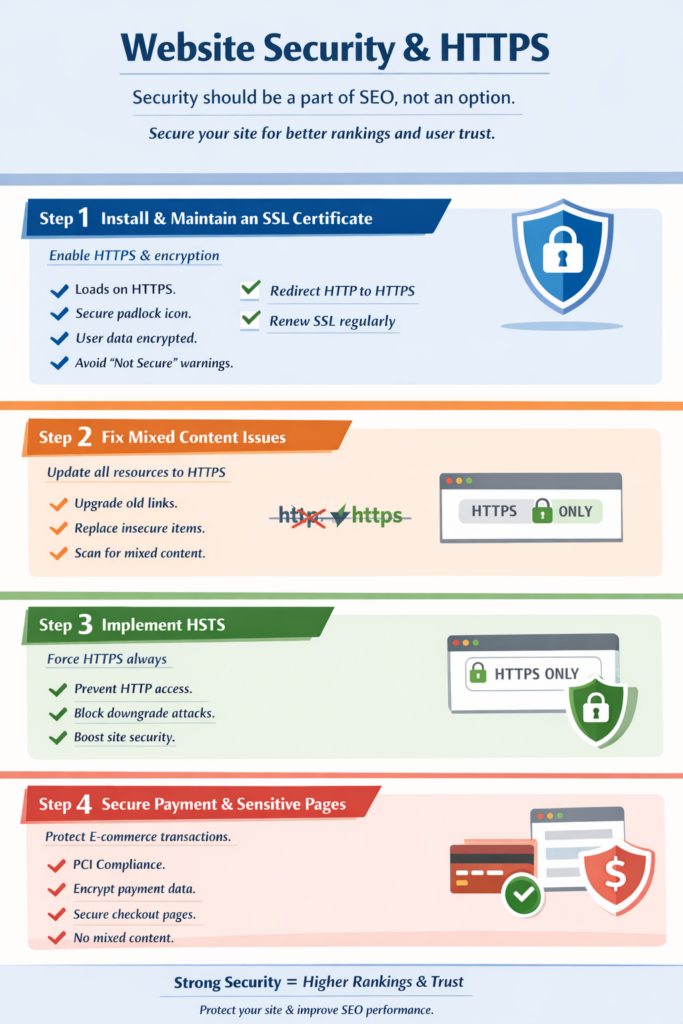
Step 1: Install and Maintain an SSL Certificate
An SSL certificate enables HTTPS and encrypts data transferred between users and your website.
When SSL is properly implemented:
- Your site loads on HTTPS, not HTTP
- Browsers display a secure lock icon
- User data is encrypted
- Search engines treat your site as secure
Without SSL, browsers may show “Not Secure” warnings — which immediately reduces trust.
Make sure:
- All pages redirect from HTTP to HTTPS
- SSL certificate is valid and renewed before expiry
Step 2: Fix Mixed Content Issues
Mixed content occurs when your website loads over HTTPS but still pulls some resources (images, scripts, stylesheets) from HTTP.
This creates security warnings and weakens protection.
Common causes:
- Old image URLs
- Hardcoded HTTP links
- Third-party scripts
To fix mixed content:
- Update all internal links to HTTPS
- Replace insecure external resources
- Use tools to scan and detect insecure elements
A fully secure page must load all resources over HTTPS.
Step 3: Implement HSTS (HTTP Strict Transport Security)
HSTS makes it so browsers are always fetching your site over HTTPS.
This:
- Prevents accidental HTTP access
- Blocks downgrade attacks
- Strengthens overall security
HSTS essentially makes it impossible for users to see the non, secure version of your site and is considered one of the best practices in web security.
However, it should only be implemented after confirming your HTTPS setup is fully stable.
Step 4: Secure Payment & Sensitive Pages (For E-commerce)
If you collect payments or sensitive data, security becomes even more critical.
Ensure:
- Payment pages are fully HTTPS
- PCI compliance standards are followed
- Sensitive data is encrypted
- No mixed content appears on checkout pages
Any security warning during checkout can immediately reduce conversions.
Trust directly impacts revenue.
Structured Data & Schema Markup
Structured data helps search engines understand your content more clearly.
While crawlability ensures search engines can access your pages, schema markup helps them interpret what your content actually means.
When implemented correctly, structured data can improve:
- Rich results visibility
- Click-through rates
- AI-driven search understanding
- Eligibility for enhanced SERP features
Here’s how to implement it properly.

Step 1: Define Your Brand with Organization Schema
Organization schema provides structured information about your business.
It typically includes:
- Business name
- Logo
- Website URL
- Contact details
- Social profiles
This helps search engines connect your brand identity across search results and knowledge panels.
For businesses, this is foundational schema.
Step 2: Mark Up Your Content with Article Schema
Article schema is used for blog posts and content pages.
It helps search engines understand:
- Author
- Publish date
- Updated date
- Headline
- Featured image
This improves content clarity and can enhance visibility in search features like Top Stories (where eligible).
Step 3: Add FAQ Schema for Rich Results
FAQ schema allows your questions and answers to appear directly in search results.
It can:
- Increase search result space
- Improve click-through rates
- Provide immediate value to users
Only apply FAQ schema to real, visible questions on your page. Avoid adding hidden or irrelevant markup.
Step 4: Use Product Schema for Commercial Pages
If you have product or service pages, Product schema becomes important.
It can include:
- Product name
- Price
- Availability
- Reviews
- Ratings
This makes your pages eligible for rich product results and improves visibility in commercial searches.
Step 5: Improve Navigation with Breadcrumb Schema
Breadcrumb schema defines your site hierarchy.
Instead of showing messy URLs in search results, Google can display:
Home > Category > Service Page
This improves:
- User understanding
- Crawl structure clarity
- Internal linking signals
Breadcrumbs strengthen site architecture from both UX and SEO perspectives.
Step 6: Strengthen Local Visibility with Local Business Schema
For businesses targeting specific locations, Local Business schema is essential.
It can include:
- Address
- Phone number
- Opening hours
- Geo-coordinates
- Business category
This supports local SEO and improves eligibility for map-related features.
Step 7: Test Your Schema Implementation
Adding schema is not enough — it must be validated.
After implementation:
- Test using Google’s Rich Results Test
- Check Schema Markup Validator
- Monitor Search Console enhancements report
- Fix warnings and errors promptly
Incorrect schema can prevent rich results eligibility.
Step 8: Optimize for AI Search & Rich Results
Search engines are increasingly powered by AI systems that rely on structured data to understand content context.
Proper schema helps:
- AI systems interpret entities and relationships
- Improve chances of appearing in rich results
- Enhance structured content extraction
- Support visibility in AI-driven search features
Structured data is no longer optional — it’s becoming a visibility requirement.
URL & Site Architecture Optimization
Your website architecture plays an important role in how search engines and users get around your content.
If your structure is messy, too deep, or disconnected, search engines have a hard time figuring out how the pages relate to each other and consequently, your rankings go down.
Good website structure helps search engines understand, index, and rank your content more easily.
Here is the correct way to optimize it.
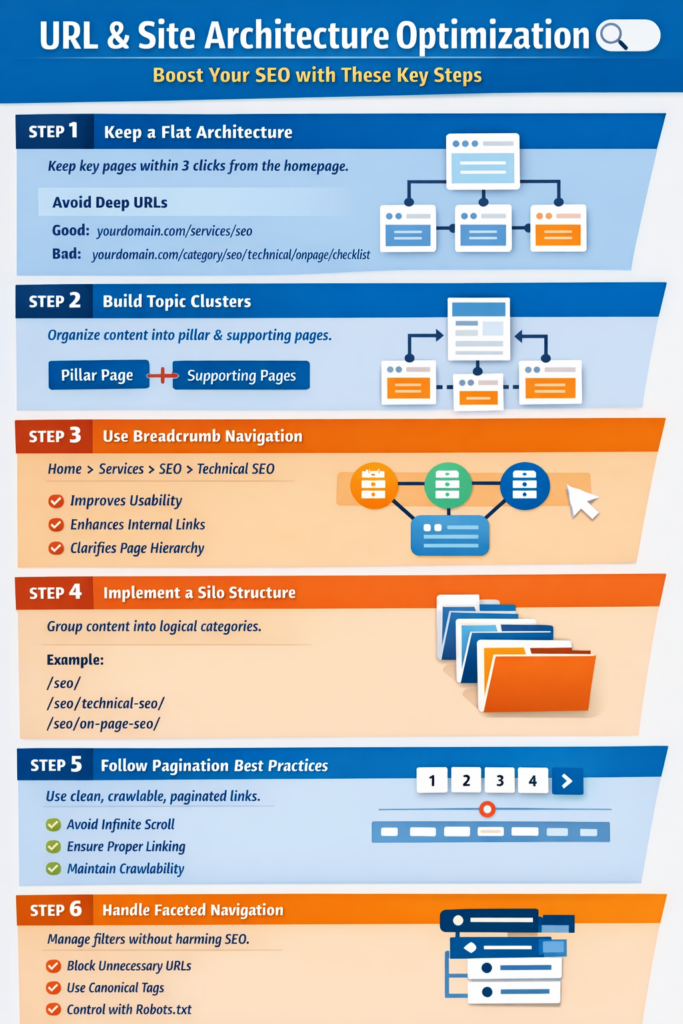
Step 1: Keep a Flat Architecture
Flat architecture means users (and search engines) can reach any important page within a few clicks.
Best practice:
- Keep key pages within 3 clicks from the homepage
- Avoid deep nested URLs
- Reduce unnecessary subfolders
Example of good structure:
yourdomain.com/services/technical-seo
Avoid overly deep paths like:
yourdomain.com/category/services/seo/technical/onpage/checklist
The fewer clicks required, the stronger the crawl efficiency.
Step 2: Build Topic Clusters
Search engines rank websites that demonstrate topical authority.
Instead of random blog posts, organize content into topic clusters:
- One main pillar page
- Multiple related supporting pages
- Strong internal linking between them
Example:
- Pillar: Technical SEO Guide
- Supporting pages: Crawlability, Core Web Vitals, Schema, etc.
Topic clusters help search engines understand subject depth and improve rankings across related keywords.
Step 3: Use Breadcrumb Navigation
Breadcrumbs improve both usability and crawl clarity.
Example:
Home > Services > Technical SEO > Crawl Budget
Benefits:
- Helps users navigate easily
- Strengthens internal linking
- Clarifies page hierarchy for search engines
Breadcrumb structured data can also enhance search result appearance.
Step 4: Implement a Silo Structure
Silo structure groups related content under logical categories.
For example:
- /seo/
- /seo/technical-seo/
- /seo/on-page-seo/
- /seo/off-page-seo/
Each section links internally within its category before linking outward.
This:
- Builds topical relevance
- Strengthens keyword themes
- Improves ranking consistency
A clear silo prevents content overlap and confusion.
Step 5: Follow Pagination Best Practices
Large blogs or eCommerce sites often use pagination.
Common mistakes:
- Poor internal linking between pages
- Infinite scroll without crawlable links
- Thin paginated content
Best practices:
- Use clean pagination URLs
- Maintain crawlable links
- Avoid blocking paginated pages unnecessarily
- Ensure important products/posts are internally linked elsewhere
Pagination should support discovery — not limit it.
Step 6: Handle Faceted Navigation Carefully
Faceted navigation (filters like price, color, size, category) can create thousands of duplicate URLs.
If unmanaged, it leads to:
- Duplicate content
- Crawl budget waste
- Index bloat
To control it:
- Block unnecessary parameter URLs
- Use canonical tags properly
- Apply noindex where needed
- Limit crawl access via robots.txt when required
Faceted navigation should enhance user experience without damaging SEO.
International SEO
If your website targets multiple countries or languages, you need more than standard SEO.
Without proper international setup:
- The wrong language version may rank
- Pages may compete with each other
- Duplicate content issues can arise
- Users may land on the wrong regional page
International SEO ensures the right content appears for the right audience.

Step 1: Implement Hreflang Tags Correctly
Hreflang tells search engines which language and country version of a page to show.
It helps:
- Prevent language-based duplication
- Avoid competition between regional pages
- Deliver the correct version to users
Without hreflang, Google may rank the wrong country page.
Step 2: Set Proper Geo-Targeting
Geo-targeting signals which country your content is intended for.
This can be done using:
- Country domains (example.co.uk)
- Subdirectories (example.com/uk/)
- Search Console settings
Clear geo signals improve regional visibility.
Step 3: Optimize for Multi-Region SEO
Serving multiple countries requires structure and localization.
Best practices:
- Create dedicated country pages
- Localize currency, contact info, and messaging
- Avoid automatic IP-based redirects
International SEO is not just translation — it’s proper localization.
Step 4: Avoid Language Duplication Issues
Similar content across regions can cause ranking confusion.
To prevent this:
- Implement proper hreflang
- Use correct canonical tags
- Keep language versions separate and complete
Clear signals prevent internal competition.
Duplicate Content & Canonicalization
Duplicate content is a common technical SEO problem and one of the most misunderstood.
When search engines encounter several versions of the same page, they get confused as to which one should be ranked. Thus, the authority might be shared, rankings could get weaker, and the visibility might decrease.
Canonicalization is a way for search engines to recognize which version of your content should be considered the main one.
Here are the steps to managing duplication right.

Step 1: Define the Primary Version with Canonical Tags
The canonical tag tells search engines which URL is the original or preferred version.
You should use it when:
- Similar pages exist with slight variations
- Product filters create multiple URLs
- Tracking parameters generate duplicates
A properly implemented canonical tag consolidates ranking signals and prevents internal competition.
Step 2: Fix HTTP vs HTTPS Conflicts
If both HTTP and HTTPS versions of your site are accessible, you’re creating duplicate versions of every page.
To fix this:
- Redirect HTTP to HTTPS using 301 redirects
- Ensure all internal links point to HTTPS
- Update canonical tags to the secure version
Only one version should be crawlable and indexable.
Step 3: Choose Between WWW and Non-WWW
Search engines treat these as two separate domains:
- www.example.com
- example.com
You must select one preferred version and redirect the other.
Consistency across redirects, internal links, and canonical tags is essential to avoid duplication.
Step 4: Control URL Parameters
URL parameters (like ?ref=ads or ?sort=price) often create multiple URLs showing the same content.
If not handled correctly, this can:
- Waste crawl budget
- Dilute ranking signals
- Increase index bloat
To manage this:
- Use canonical tags
- Block unnecessary parameters
- Keep your URL structure clean
Less variation means stronger authority consolidation.
Step 5: Manage Content Syndication Carefully
If your content is republished on other websites, search engines may struggle to determine the original source.
To protect your rankings:
- Publish content on your site first
- Request canonical attribution from partners
- Monitor duplicate versions
Your domain should always retain primary authority.
Log File Analysis (Advanced Section)
Most technical SEO audits rely on third-party tools.
But if you want to understand how search engines actually interact with your website, you need to analyze your server log files.
Log file analysis shows real bot activity — not assumptions, not estimates, but actual crawl behavior.
This is where technical SEO becomes data driven.
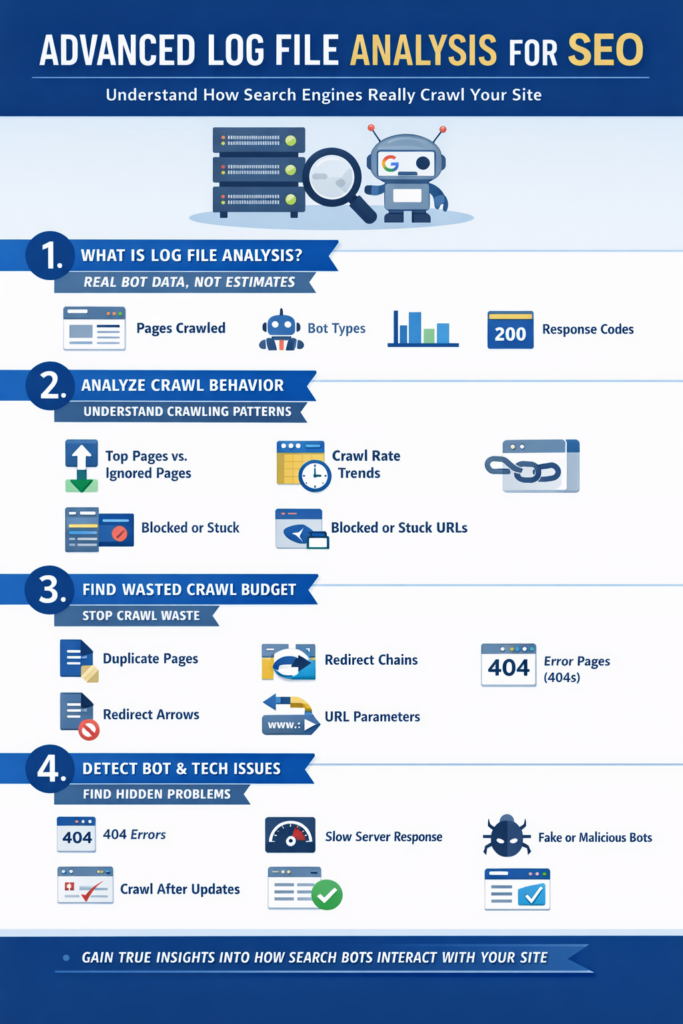
Step 1: Understand What Log File Analysis Is
Every time a search engine bot visits your website, your server records it.
These records (log files) show:
- Which pages were crawled
- How often they were crawled
- Which bots accessed them
- What response code was returned
Unlike SEO tools that simulate crawling, log files reveal what Google and other bots are truly doing.
Step 2: Analyze Crawl Behavior
Log files help you understand:
- Which pages Google prioritizes
- Which sections are ignored
- Crawl frequency patterns
- Response time issues
You may discover that:
- Low-value pages are crawled frequently
- Important pages are rarely visited
- Bots are stuck in certain URL paths
This insight allows you to restructure strategically.
Step 3: Identify Wasted Crawl Budget
Search engines allocate limited crawl resources.
Log analysis helps you detect if bots are wasting time on:
- Parameter-based URLs
- Redirect chains
- Duplicate pages
- Error pages
If bots spend too much time on low-value URLs, your priority pages may not get crawled often enough.
Fixing this improves crawl efficiency and indexing speed.
Step 4: Detect Bot & Technical Issues
Log files can uncover hidden problems such as:
- High crawl activity on 404 pages
- Slow server response times
- Unusual bot behavior
- Malicious or fake bot traffic
You can also verify whether:
- Important pages are being crawled after updates
- New content is discovered quickly
- Core pages are consistently revisited
This level of visibility is rarely achieved without log analysis.
Technical SEO for AI & Search Generative Experience
Search is no longer about 10 blue links only.
Thanks to AI, powered results and Search Generative Experiences (SGE), nowadays search engines not only extract, summarize, and generate from content of the websites but also create the answers.
Ranking in 2026 will not be about getting the highest position, it will be about gaining the trust of AI systems as a highly reliable source.
Here are the ways you can technically optimize for AI, driven search.

Step 1: Optimize for AI Overviews
AI Overviews summarize content from multiple sources.
To increase your chances of inclusion:
- Answer questions clearly and directly
- Use structured headings (H2, H3)
- Provide concise definitions and summaries
- Add FAQ sections
AI prefers content that is easy to extract and understand.
Step 2: Structure Content for AI Extraction
AI systems scan structure before meaning.
Make your pages:
- Well-organized with logical heading hierarchy
- Broken into short, clear sections
- Supported by bullet points and lists
- Focused on one primary topic per page
Clean structure improves machine readability.
Step 3: Implement Entity-Based SEO
Search engines now understand entities (brands, people, concepts) instead of just keywords.
To strengthen entity signals:
- Clearly define your brand
- Maintain consistent brand mentions
- Link to authoritative related entities
- Build topical authority around core subjects
Strong entity clarity improves AI trust.
Step 4: Use Structured Data for AI
Structured data helps search engines understand context.
Important schema types include:
- FAQ schema
- Article schema
- Organization schema
- Author schema
Structured data increases eligibility for rich results and AI extraction.
Step 5: Strengthen Brand Signals
AI systems prioritize trusted brands.
Improve brand authority by:
- Maintaining consistent NAP (Name, Address, Phone) details
- Building high-quality backlinks
- Increasing branded searches
- Keeping social and directory profiles aligned
Strong brand signals increase credibility in AI-driven results.
Step 6: Build Semantic Internal Linking
Internal links should reflect topic relationships — not just navigation.
Best practices:
- Link related content clusters
- Use descriptive anchor text
- Support pillar pages with relevant subtopics
Semantic linking helps AI understand topic depth and authority.
Step 7: Establish Author Credibility
AI prioritizes content created by credible sources.
Strengthen author trust by:
- Adding detailed author bios
- Showcasing expertise and experience
- Linking to professional profiles
- Maintaining consistent authorship across content
Trust and expertise matter more in AI-driven search.
Essential Technical SEO Tools for 2026
You can’t enhance what you haven’t measured first, right? If you have the right tools, you will be able to pinpoint where the errors are, solve the performance issues and even outrun the competitors.
Here is a list of technical SEO tools you will absolutely need in 2026:

- Google Search Console – Keep track of indexing, crawl errors, Core Web Vitals, and search performance.
- Screaming Frog – Conduct thorough site crawls to uncover broken links, duplicate content, redirects, and other outstanding technical problems.
- Page Speed Insights – Evaluate the website loading speed and Core Web Vitals performance.
- Lighthouse – Check the performance, accessibility, SEO, and overall quality of a page.
- Ahrefs / SEMrush – Keep track of backlinks, keyword rankings, site health, and competitor performance.
- Log File Analyzers – Gain knowledge of how the search engine bots crawl your website and efficiently manage the crawl budget.
Signs Your Website Needs a Technical SEO Fix
Content and links are not always the main culprit your technical groundwork might be. Even if you have excellent content, your website ranking and traffic will stay low if you keep having technical issues that no one can see.
Here are obvious indications that you may need a Technical SEO professional:
- Sudden traffic drop – If you lose your organic traffic overnight, it could be due to your technical faults, indexing problems, or algorithm impacts that you are unaware of.
- Pages not getting indexed – Google doesnt show some of your most important pages.
- Large website issues – E-commerce, SaaS, or enterprise sites with thousands of URLs usually encounter crawl budget, duplicate content, or structure issues.
- Slow website performance – Poor Core Web Vitals and slow load times are affecting your ranking and conversions.
- Frequent technical errors – 404 errors, redirect chains, broken internal links, or server issues.
- Scaling to enterprise level – Going global, adding lots of categories, or changing the platform needs technical expertise.
Final Thoughts: Future-Proof Your Website for 2026 and Beyond
Technical SEO is far from a one, off project work, it is an enduring strategy. Since search engines gradually become AI, powered, it is essential that your website stays optimized, quick, and technically sound.
AI first indexing – Organize your material in such a way that it is very easy for search engines to comprehend and quote it.
Continuous optimization – Frequent site reviews and updates ensure that your website stays in the game.
Monitoring & reporting – Keep an eye on the site’s performance and get rid of the problems before they become detrimental to the rankings.
Therefore, start building a robust technical base now if you want to continue leading in 2026 and further years.