
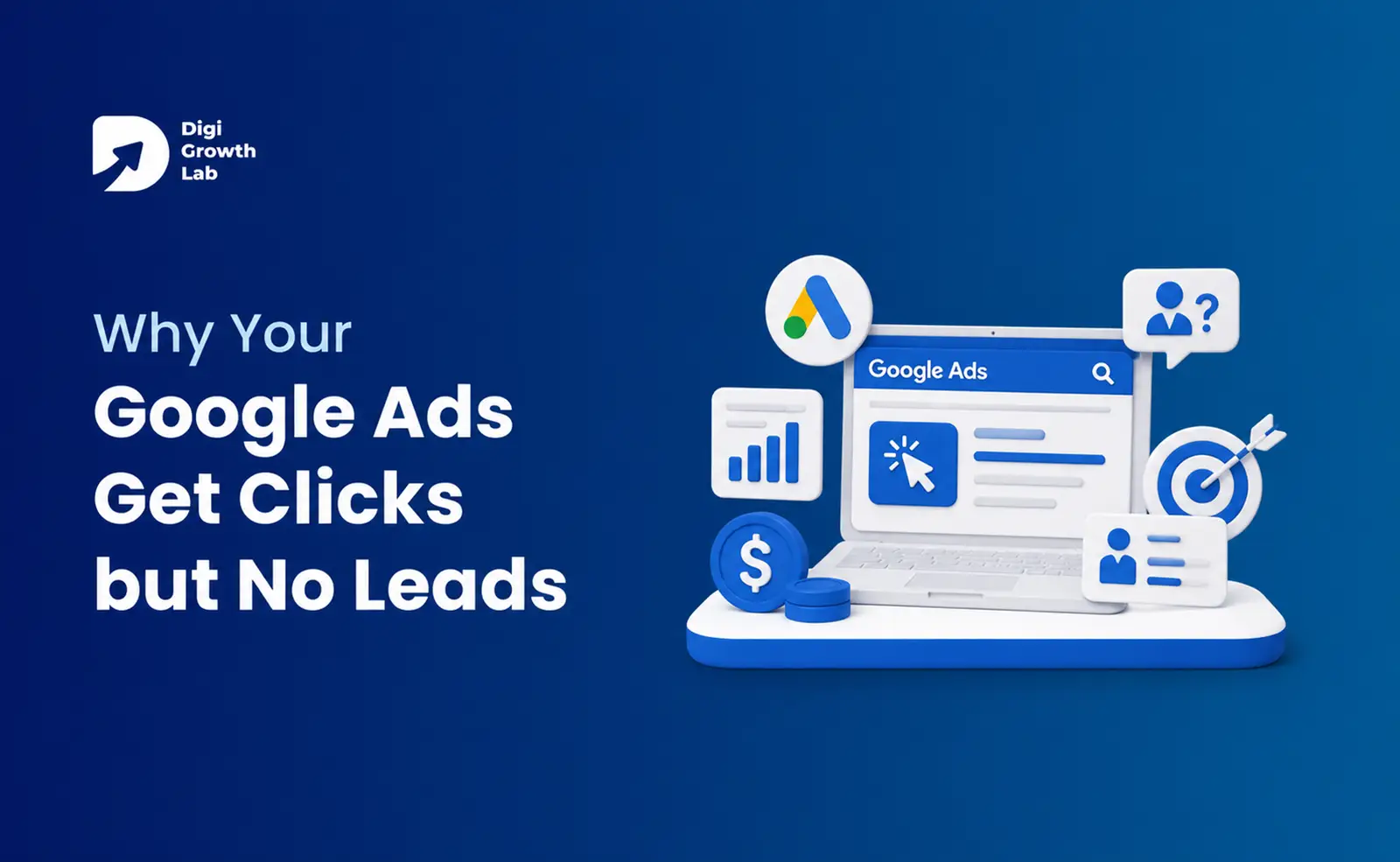
You are paying for clicks. People are visiting your site. But the phone stays quiet and the contact form stays empty. It feels like you are pouring money into Google and getting nothing back.

The short answer: clicks measure attention, leads measure intent, and the gap between the two almost never sits in your ad. It sits in what happens after the click.
A high click-through rate only tells you people found your ad interesting enough to tap. It says nothing about whether they were the right people, whether they landed on the right page, or whether you gave them a reason to act.
When your Google Ads get clicks but no leads, something between the click and the contact form is leaking. Here is where to look, in the order that matters.
First, rule out the invisible problem: your tracking is broken
Your phone rings and forms arrive, but the dashboard shows zero conversions.
Before you change a single keyword, check whether you are already getting leads that Google simply is not showing you.
If the tracking tag was never set up correctly, got wiped in a website redesign, or your thank you page stopped firing the code, Google records nothing. You end up panicking over a campaign that is quietly working.
The bigger problem is that Google’s bidding relies on that data. If it cannot see which clicks turn into leads, it keeps chasing cheap clicks instead of real customers, so you pay for more of the wrong traffic.
THE FIX
Open your Google Ads account, go to Conversions, and check the status. If it says “no recent conversions” or
“tag not set up,” submit a test form on your own site and watch whether it registers. Fix this before anything else, because You are sending clicks to your homepage, not a landing page
You are sending clicks to your homepage, not a landing page
The single most expensive habit in Google Ads, and almost everyone starts here.
Your homepage has to serve everyone. It carries a menu with a dozen links, a bit about your history, a blog, and three competing calls to action. Someone who clicked an ad for “emergency AC repair in Ahmedabad” does not want to explore your company. They want to know if you can come today.
A dedicated landing page does one job. It matches the ad, removes the navigation, states one offer, and puts one clear action in front of the visitor.
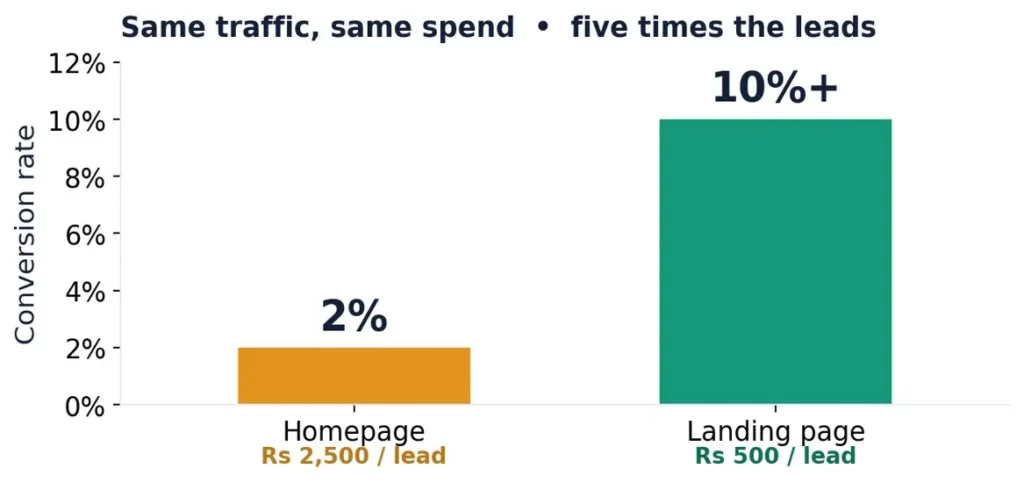
For context, Unbounce studied 41,000 landing pages and found a median conversion rate of 6.6%, with traffic from Google search ads converting at a 10.9% median. A busy homepage rarely comes close.
THE FIX
Build one focused landing page per offer. One promise, one action, no navigation. This is one of the fastest ways to stop your Google Ads wasting budget.
Your landing page doesn’t match what the ad promised
A trap called message match. Break it and people bounce in one tap.
Even with a proper landing page, the promise has to carry through. If the ad says one thing and the page says another, the visitor loses the thread and leaves.
| SCENT LOST | SCENT HELD |
|---|---|
| Search: “24 hour plumber near me”
Ad: “24 Hour Plumber, Call Now.” Page: “Trusted Family Plumbing Since 1998.” Nice page, wrong moment. Back button. |
Search: “24 hour plumber near me”
Ad: “24 Hour Plumber, Call Now.” Page: “24/7 Emergency Plumber in 60 Minutes.” Same problem, same promise. They call. |
THE FIX
Pull up your top five ads, click each one, and ask: does the page show the same promise the ad made? The headline, first line, and main button should all echo what the person searched for. Fixing these lifts conversions with zero extra spend.
The wrong people are clicking
Sometimes the click itself is the problem.
The usual cause is broad keyword matching with no cleanup. Add a keyword like “plumber” without controlling how it matches, and Google shows your ad across loosely related searches.
WHAT YOU ACTUALLY PAID FOR
A plumber runs broad keywords on a Rs 4,000 daily budget. The search terms report reveals the real triggers: “plumber salary,” “plumbing course fees,” “plumber job vacancy,” “how to fix a tap yourself.” Roughly 15% of the spend went to real buying intent. The rest is gone.
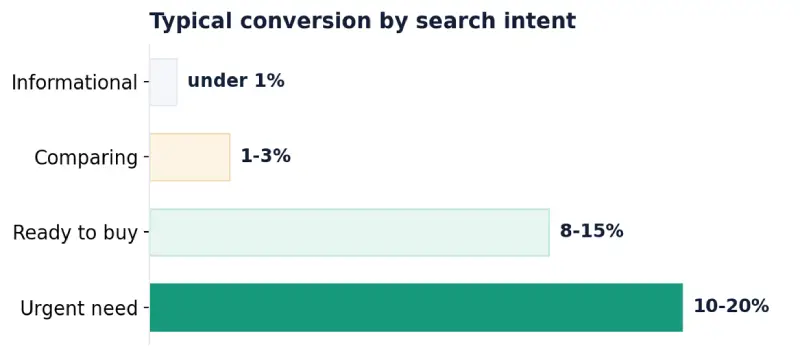
There is also a difference between people researching and people ready to buy. Someone searching “how does solar work” is learning. Someone searching “solar installation cost near me” is shopping. Intent runs on a ladder:
THE FIX
Add negative keywords so your ad stops showing for junk like “free,” “cheap,” “jobs,” “course,” and “DIY.” Then review your search terms report weekly. Ten minutes a week on that one report does more to stop Google Ads not converting than almost anything else.
Your landing page speaks marketing, not human
The cause most guides skip, and maybe the easiest to fix.
The words on your page decide whether people stay. And plain, simple words win by a wide margin.
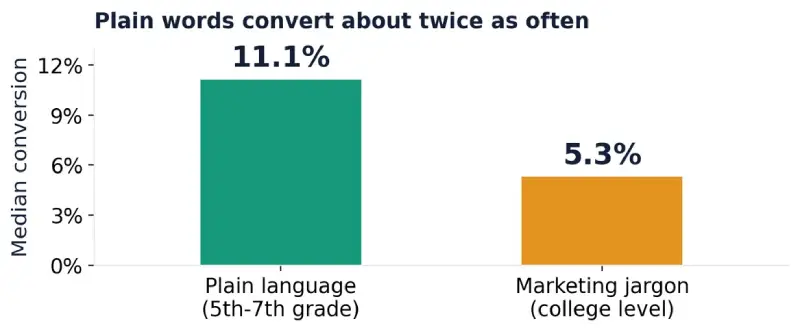
| 2× | Copy written at a 5th to 7th grade reading level converted at 11.1%. The same message at a college level converted at just 5.3%. Difficult words were linked to a 24.3% drop in conversions.
Source: Unbounce, 41,000+ landing pages. |
Yet so many pages are stuffed with “end to end solutions,” “synergistic offerings,” and “leverage our expertise.” Nobody searches for that, and nobody is reassured by it.
If a ten year old could not understand what you do and what to do next, your page is too complicated.
THE FIX
Say what you do in the words your customer would use. Replace jargon with the plain version. Cut any sentence that reads like a brochure. Clear beats clever, and clear also converts.
Too much friction between interest and action
A visitor can want to contact you and still give up because you made it a chore.
The most common culprit is a long form. Every extra field is another reason to abandon the page.
| 23 | The average online checkout shows around 23 form elements by default, and most could cut 20 to 60% of them without losing anything they need. Trimming that friction drove an average 35% lift in conversions. The same principle applies to any lead form.
Source: Baymard Institute |
Ask for the least you need to start a conversation. Often that is just a name and a phone number. You can learn the rest when you talk to them.
Friction hides elsewhere too. A slow page loses impatient visitors who came from an ad. A phone number that is not tappable on mobile makes people work to reach you. A buried call to action leaves them unsure what to do next.
THE FIX
Open your own landing page on your phone. Can you see the main action within a second or two? Can you fill the form with one thumb? If not, fix that before spending another rupee on clicks.
You are getting leads, but they are the wrong ones
The forms fill up and it still feels like no leads. A different problem, and most guides ignore it.
If enquiries keep coming from outside your service area, with budgets far below your minimum, or for things you do not offer, your campaign is working mechanically but attracting the wrong crowd. That is a lead quality problem, not a lead volume problem.
THE FIX
Tighten location settings to where you actually work, and check Google is not quietly expanding your reach. Use ad copy to pre-qualify: if you only take projects above a certain size, hint at it so bargain hunters scroll past. Add negatives for services you do not provide. The goal is to improve your Google Ads lead quality, so your sales time goes to people who can actually become customers.
You are getting leads and then losing them
The quietest lead killer of all, and it has nothing to do with Google.
A lead is not a customer. It is a person who raised their hand and is now waiting. If that enquiry sits in an inbox for a few hours, or overnight, the person has often already called the next business on their list.
Your ad budget bought that lead. A slow reply throws it away.
THE FIX
Set up an instant notification so new leads reach you the moment they arrive. Reply in minutes, not hours, especially for anything urgent. If you cannot always be available, a simple auto-reply confirming you got their message keeps them from wandering off.
The honest edge cases
Once the big causes are handled, a few smaller ones are worth a look.
Invalid and bot clicks. A share of paid traffic comes from bots or accidental taps. Google filters much of it, but watch for clicks with no engagement at all.
Search Partners. Google can show your ads on partner sites beyond its own results, often at lower intent. Try turning them off and compare results over two weeks.
Budget too thin. If you barely get a click a day, you will never gather enough data to judge what works. Concentrate spend on your best keywords.
Not enough time. Changing your campaign daily resets Google’s learning. Give a change at least two weeks before you judge it.
A 15-minute self-diagnosis you can run today
You do not need an agency to find your leak. Run these five checks in order.
- Check conversion tracking. Zero conversions after weeks of spend? Start here. Everything depends on it.
- Click one of your live ads. If it drops you on your homepage, that is your next fix.
- Compare the ad headline to the page headline. If they do not make the same promise, message match is broken.
- Open your search terms report (last 30 days). If more than a fifth of clicks came from junk searches, your keywords and negatives need work.
- Open your landing page on your phone. Time the load and how easy it is to contact you. Slow or fiddly? Fix the friction.
By the end you will know exactly which causes are costing you money, and in what order to tackle them.
Clicks are the beginning, not the win
A click is one person, mildly interested, giving you a few seconds of attention. What you do with those seconds decides whether they become a lead.
For perspective, WordStream’s 2026 data puts the average Google Ads conversion rate at around 8% across industries. Plenty of older articles still quote a figure near 3.75%, but that traces back to a 2016 study and no longer reflects reality. Turning clicks into leads is very achievable when the path after the click is clear.
So if your Google Ads get clicks but no leads, follow the trail: confirm tracking, match the page to the ad, speak plainly, remove friction, then answer fast. Do that, and the clicks you are already paying for will finally turn into leads.
Need Help Turning Clicks into Leads?
We help businesses fix underperforming Google Ads campaigns and improve lead quality, starting with a free audit of your tracking, landing pages, and campaign structure.
Frequently Asked Questions
Why am I getting clicks but no leads on Google Ads?
Because clicks and leads are two different things. A click just means someone found your ad interesting enough to tap. Whether they become a lead depends on what happens next: whether your tracking is working, whether the page matches the ad, whether the right people are clicking, and how easy you make it to contact you. In almost every case the problem sits after the click, not in the ad itself, and it is fixable.
How long should it take for Google Ads to start generating leads?
A properly set up campaign usually starts producing leads within two to four weeks. The first week or so is Google’s learning phase, where it tests different audiences and settles in. If you have spent a meaningful amount over 30 days and still have zero leads, that is not a patience problem. Something is structurally broken, usually tracking, keywords, or the landing page, and it needs a fix rather than more time.
My phone is ringing but Google Ads shows zero conversions. What is wrong?
Your conversion tracking is almost certainly broken or was never set up. The leads are real, Google just cannot see them, so your dashboard reads empty. This is worth fixing fast, because Google uses that data to decide who to show your ads to. Without it, the system keeps chasing cheap clicks instead of the searches that actually turn into calls.
Is it my ads or my website that is the problem?
Nine times out of ten it is the website and the setup, not the ad. If people are clicking, the ad is doing its job of earning attention. The gap between that click and an enquiry almost always lives on the landing page, in the offer, or in the tracking. That is good news, because those are the parts you can control and improve quickly.
How much should I spend on Google Ads to actually get leads?
There is no single number, because it depends on how much a click costs in your industry and how competitive your keywords are. The bigger mistake is spreading a small budget too thin across too many keywords, so you never gather enough data to see what works. It is almost always better to focus a modest budget on your highest-intent keywords than to run a little bit of everything.
Can I fix this myself, or do I need help?
Many of these leaks you can diagnose yourself in about 15 minutes using the checklist above, and some fixes, like adding negative keywords, are quick wins. But if you have run the checks and are still burning budget, or you are not sure which fix to tackle first, that is the point where an outside audit saves you money rather than costing it. A fresh look at your tracking, landing pages, and keywords usually finds the leak fast.